
260514
我们 01-SLAM-建图与定位 这部分搞定了,接下来就可以开始 02-Nav2-导航接入 了。
Nav2 可以让我们的机器人在 SLAM 建模后的环境中导航到指定的位置。
我们先修改一下我们的 Mode,需要新增一个 NAV2 的模式:
class Mode(IntEnum):
    STOP = 0
    CRUISE = 1
    MANUAL = 2
    FOLLOW = 3
    NAV2 = 4
嗯...奇怪,貌似我们的 python 文件中有两个 Mode 的定义:
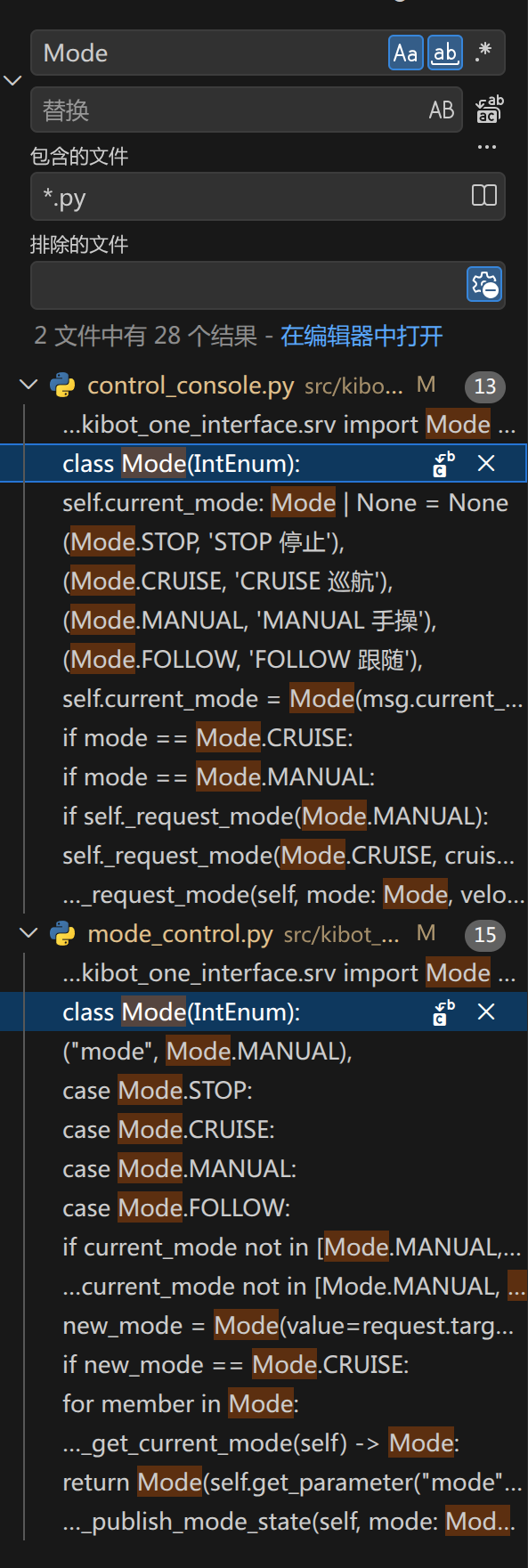
我们都整合到同一个文件好了,就叫 schemas.py 吧。
在 src/kibot_one_control/kibot_one_control/schems.py 中写入如下的内容:
from enum import IntEnum

class Mode(IntEnum):
    STOP = 0
    CRUISE = 1
    MANUAL = 2
    FOLLOW = 3
    NAV2 = 4
然后在我们的这两个文件里引入:
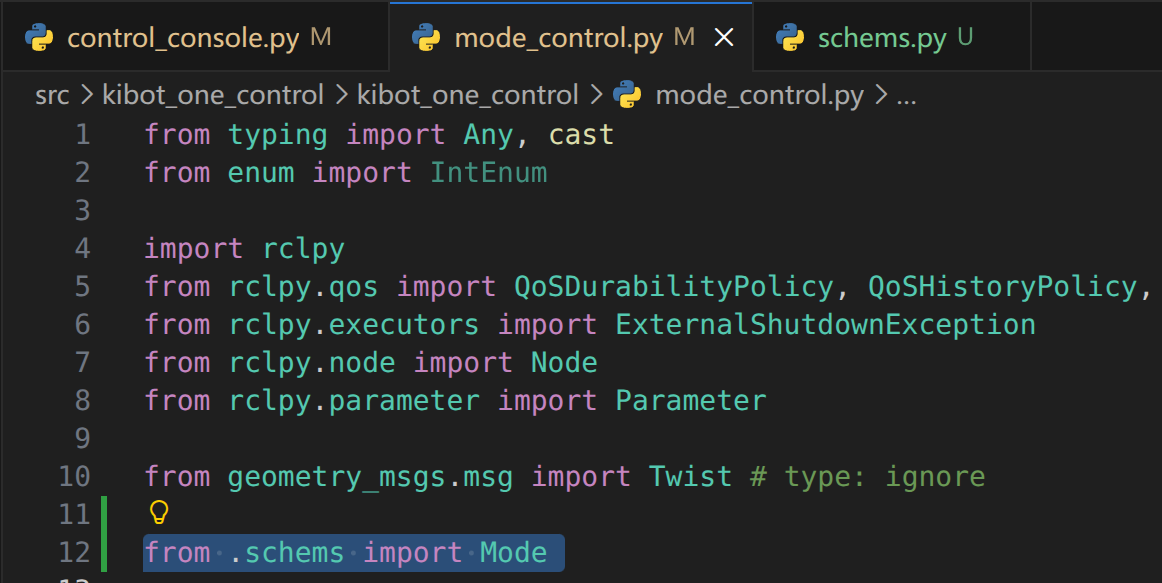
嗯...文件名有点问题,应该是 schemas.py,而不是 schems.py。
我们继续进行替换,除了我们的 python 文件以外,我们的 .msg, .srv 文件也要改一下。
首先是 src/kibot_one_interface/msg/Mode.msg,我们改成下面这样的:
uint8 STOP = 0
uint8 CRUISE = 1
uint8 MANUAL = 2
uint8 FOLLOW = 3
uint8 NAV2 = 4
嗯...不太对,我们还有一个 src/kibot_one_interface/msg/ModeState.msg,内容如下:
uint8 STOP = 0
uint8 CRUISE = 1
uint8 MANUAL = 2
uint8 FOLLOW = 3

uint8 current_mode
因此,我们的 Mode.msg 实际上是多余的,删掉吧。
src/kibot_one_interface/CMakeLists.txt 中也要删掉这个文件的引用:
rosidl_generate_interfaces(${PROJECT_NAME}
  "msg/ModeState.msg"
  "srv/Mode.srv"
  DEPENDENCIES geometry_msgs
)
然后把我们的 src/kibot_one_interface/msg/ModeState.msg 改成这样:
uint8 STOP = 0
uint8 CRUISE = 1
uint8 MANUAL = 2
uint8 FOLLOW = 3
uint8 NAV2 = 4

uint8 current_mode
然后我们看了一下,我们的 .srv 文件倒是没必要改。
然后是 src/kibot_one_control/kibot_one_control/mode_control.py,我们将其中的 _pub_timer_callback 函数改成下面这样的:
    def _pub_timer_callback(self) -> None:
        current_mode = self._get_current_mode()
        match current_mode:
            case Mode.STOP:
                self.linear_velocity = Twist()
            case Mode.CRUISE:
                pass
            case Mode.MANUAL:
                self.linear_velocity = Twist()
            case Mode.FOLLOW:
                pass
            case Mode.NAV2:  # 增加 NAV2 Mode
                pass

        if current_mode not in [Mode.MANUAL, Mode.FOLLOW, Mode.NAV2]: # 增加 NAV2 Mode
            self.mode_vel_publisher.publish(self.linear_velocity)
然后,由于我们预期的链路是这样的:
Nav2 controller_server -> /cmd_vel_raw -> cmd_vel_watchdog -> /cmd_vel -> Gazebo
所以需要让 Nav2 输出到 /cmd_vel_raw 中。
因此,我们可以创建下面这个 Nav2 的配置为文件 src/kibot_one_sim/config/nav2_params.yaml:
bt_navigator:
  ros__parameters:
    use_sim_time: true
    global_frame: map
    robot_base_frame: base_link
    odom_topic: /odom
    bt_loop_duration: 10
    default_server_timeout: 20
    wait_for_service_timeout: 1000
    navigators: ["navigate_to_pose"]
    navigate_to_pose:
      plugin: "nav2_bt_navigator::NavigateToPoseNavigator"

controller_server:
  ros__parameters:
    use_sim_time: true
    controller_frequency: 20.0
    min_x_velocity_threshold: 0.001
    min_y_velocity_threshold: 0.5
    min_theta_velocity_threshold: 0.001
    failure_tolerance: 0.3
    odom_topic: /odom

    progress_checker_plugins: ["progress_checker"]
    goal_checker_plugins: ["goal_checker"]
    controller_plugins: ["FollowPath"]

    progress_checker:
      plugin: "nav2_controller::SimpleProgressChecker"
      required_movement_radius: 0.2
      movement_time_allowance: 10.0

    goal_checker:
      plugin: "nav2_controller::SimpleGoalChecker"
      xy_goal_tolerance: 0.25
      yaw_goal_tolerance: 0.25
      stateful: true

    FollowPath:
      plugin: "nav2_regulated_pure_pursuit_controller::RegulatedPurePursuitController"
      desired_linear_vel: 0.25
      lookahead_dist: 0.5
      min_lookahead_dist: 0.3
      max_lookahead_dist: 0.9
      lookahead_time: 1.5
      rotate_to_heading_angular_vel: 0.8
      transform_tolerance: 0.2
      use_velocity_scaled_lookahead_dist: false
      min_approach_linear_velocity: 0.05
      approach_velocity_scaling_dist: 0.6
      use_collision_detection: true
      max_allowed_time_to_collision_up_to_carrot: 1.0
      use_regulated_linear_velocity_scaling: true
      use_cost_regulated_linear_velocity_scaling: false
      regulated_linear_scaling_min_radius: 0.9
      regulated_linear_scaling_min_speed: 0.05
      use_rotate_to_heading: true
      allow_reversing: false
      rotate_to_heading_min_angle: 0.785
      max_angular_accel: 1.5
      max_robot_pose_search_dist: 10.0

planner_server:
  ros__parameters:
    use_sim_time: true
    expected_planner_frequency: 5.0
    planner_plugins: ["GridBased"]

    GridBased:
      plugin: "nav2_navfn_planner::NavfnPlanner"
      tolerance: 0.5
      use_astar: false
      allow_unknown: true

behavior_server:
  ros__parameters:
    use_sim_time: true
    costmap_topic: local_costmap/costmap_raw
    footprint_topic: local_costmap/published_footprint
    cycle_frequency: 10.0
    behavior_plugins: ["spin", "backup", "drive_on_heading", "wait"]
    global_frame: odom
    robot_base_frame: base_link
    transform_tolerance: 0.2
    simulate_ahead_time: 2.0
    max_rotational_vel: 0.8
    min_rotational_vel: 0.2
    rotational_acc_lim: 1.5

    spin:
      plugin: "nav2_behaviors::Spin"
    backup:
      plugin: "nav2_behaviors::BackUp"
    drive_on_heading:
      plugin: "nav2_behaviors::DriveOnHeading"
    wait:
      plugin: "nav2_behaviors::Wait"

local_costmap:
  local_costmap:
    ros__parameters:
      use_sim_time: true
      update_frequency: 5.0
      publish_frequency: 2.0
      global_frame: odom
      robot_base_frame: base_link
      rolling_window: true
      width: 3
      height: 3
      resolution: 0.05
      robot_radius: 0.37
      always_send_full_costmap: true
      plugins: ["obstacle_layer", "inflation_layer"]

      obstacle_layer:
        plugin: "nav2_costmap_2d::ObstacleLayer"
        enabled: true
        observation_sources: scan
        scan:
          topic: /scan
          max_obstacle_height: 2.0
          clearing: true
          marking: true
          data_type: LaserScan
          raytrace_max_range: 12.0
          raytrace_min_range: 0.0
          obstacle_max_range: 8.0
          obstacle_min_range: 0.0
          inf_is_valid: true

      inflation_layer:
        plugin: "nav2_costmap_2d::InflationLayer"
        enabled: true
        cost_scaling_factor: 3.0
        inflation_radius: 0.45

global_costmap:
  global_costmap:
    ros__parameters:
      use_sim_time: true
      update_frequency: 1.0
      publish_frequency: 1.0
      global_frame: map
      robot_base_frame: base_link
      resolution: 0.05
      robot_radius: 0.37
      track_unknown_space: true
      always_send_full_costmap: true
      plugins: ["static_layer", "obstacle_layer", "inflation_layer"]

      static_layer:
        plugin: "nav2_costmap_2d::StaticLayer"
        enabled: true
        map_topic: /map
        map_subscribe_transient_local: true

      obstacle_layer:
        plugin: "nav2_costmap_2d::ObstacleLayer"
        enabled: true
        observation_sources: scan
        scan:
          topic: /scan
          max_obstacle_height: 2.0
          clearing: true
          marking: true
          data_type: LaserScan
          raytrace_max_range: 12.0
          raytrace_min_range: 0.0
          obstacle_max_range: 8.0
          obstacle_min_range: 0.0
          inf_is_valid: true

      inflation_layer:
        plugin: "nav2_costmap_2d::InflationLayer"
        enabled: true
        cost_scaling_factor: 3.0
        inflation_radius: 0.45
我们来拆一下,我们写了哪些东西的配置。
总的来说,整个结构可以理解为:
nav2_params.yaml
├── bt_navigator        # 接收 NavigateToPose action,管理导航行为树
├── controller_server   # 跟踪路径,输出速度
├── planner_server      # 根据地图规划全局路径
├── behavior_server     # 处理恢复行为,比如旋转、后退、等待
├── local_costmap       # 机器人附近的局部代价地图
└── global_costmap      # 全局地图上的代价地图