
260511
孩子们,我又有 pro 用了:
继我们上次理解了 TF 在我们 SLAM 建图中有什么用,我们接下来就可以在我们的系统中引入 SLAM 这个东西了。
我们先给 src/kibot_one_sim/package.xml 补上下面的依赖:
<exec_depend>launch_ros</exec_depend>
<exec_depend>slam_toolbox</exec_depend>
<exec_depend>tf2_ros</exec_depend>
由于我们后续还要用到 rviz2 来进行可视化,因此还可以安装一下 rivz2:
sudo apt install ros-$ROS_DISTRO-rviz2
然后我们新增一个参数文件: src/kibot_one_sim/config/slam_toolbox.yaml:
slam_toolbox:
  ros__parameters:
    use_sim_time: true
    mode: mapping

    map_frame: map
    odom_frame: odom
    base_frame: base_link
    scan_topic: /scan

    transform_publish_period: 0.05
    map_update_interval: 1.0
    resolution: 0.05
    max_laser_range: 12.0

    minimum_travel_distance: 0.05
    minimum_travel_heading: 0.05
这里的 use_sim_time和我们之前对于世界的 .sdf 文件中的配置在语义上是一致的,都是指是否要使用仿真的时间而非我们电脑的 CPU 时间。
mode 是 mapping,指异步建图,符合我们预期的小车边走边进行建图的模式。
除了 mapping模式以外,还有一个模式叫做 localization,在这种模式下将停止进行画图,地图此时变成了只读的情况。
不过此时我们的 SLAM 依旧会接受 /scan 的话题内容,用于精准算出我们小车当前在地图上的绝对坐标。
这其中最关键的是下面几个字段:
map_frame: map
odom_frame: odom
base_frame: base_link
scan_topic: /scan
这几个字段表示了坐标系和话题绑定在哪。
我们这里 map_frame 绑定在了 map 上,这是 SLAM 算法自行创建的最高级、绝对静止的全局坐标系名称。
而下面的 odom_frame 和 base_frame 则分别绑定了我们小车的 odom 和 base_link。
最后是 scan_topic,自然就是我们的 /scan 了。
再往下,就是
transform_publish_period: 0.05
map_update_interval: 1.0
resolution: 0.05
max_laser_range: 12.0
这几个字段了。
这里 transform_publish_period代表我们 TF 变换 map -> odom 的周期,单位为秒,这里我们填写 0.05,即 20Hz。
然后下面是 map_update_interval,这个参数用于决定黑白灰的二维图片通过 /map 话题发布到 RViz 的频率,单位同样为秒,这个参数不影响底层的数学计算。
下面是 resolution,即分辨率, 这代表着地图上的每一个像素点代表真实物理世界中的多大区域,单位为米/格,这里我们填写为 0.05,即 5cm/格,实际代表每格 5cm*5cm=25cm^2 的范围。
最后是 max_laser_range,这个参数决定了激光雷达可信的范围是多少,这里同我们 src/kibot_one_sim/models/kibot_one_base/model.sdf 中对于 gpu_lidar 写的一致,都是 12m。
继续往下,则是 minimum_travel_distance 和 minimum_travel_heading 这两个参数了,前者为最小移动距离,单位为米,只有当底盘实际移动的距离超过了这个值, SLAM 才会拍下新的一帧雷达数据放到地图里进行矩阵匹配;后者则为最小旋转角度,哪怕车没有往前走,只要它转向超过了这个弧度,也会触发一次建图计算。
两者我们分别填写的是 5cm 和 0.05rad。
继续往下,新增 src/kibot_one_sim/launch/slam.launch.py:
# mypy: disable-error-code="import-untyped"

from pathlib import Path

from ament_index_python.packages import get_package_share_directory
from launch import LaunchDescription
from launch.actions import DeclareLaunchArgument
from launch.conditions import IfCondition
from launch.substitutions import LaunchConfiguration
from launch_ros.actions import Node

def generate_launch_description() -> LaunchDescription:
    pkg_share = Path(get_package_share_directory(package_name="kibot_one_sim"))
    params_file = pkg_share / "config" / "slam_toolbox.yaml"

    use_lidar_static_tf_arg = DeclareLaunchArgument(
        name="use_lidar_static_tf",
        defautl_vaule="true",
        description="如果 Gazebo 没有提供 base_link -> lidar_link, 就补一个静态 TF"
    )

    lidar_static_tf = Node(
        package="tf2_ros",
        executable="static_transform_publisher",
        name="base_to_lidar_static_tf",
        arguments=["0.20","0.0","0.165","0.0","0.0","0.0","base_link","lidar_link"],
        condition=IfCondition(LaunchConfiguration(variable_name="use_lidar_static_tf"))
    )

    slam_toolbox = Node(
        package="slam_toolbox",
        executable="async_slam_toolbox_node",
        name="slam_toolbox",
        output="screen",
        parameters=[str(params_file)]
    )

    return LaunchDescription([
        use_lidar_static_tf_arg,
        lidar_static_tf,
        slam_toolbox
    ])
该文件目前负责两个事:
- 启动 slam_toolbox。
- 必要时补 base_link -> lidar_link 静态 TF。
对于该静态 TF,我们选择的位姿为我们在 src/kibot_one_sim/models/kibot_one_base/model.sdf 中对于 lidar_link 这一 link 的 pose 值
至于为什么不直接改现在的总 launch,一个是为了解耦,我们启动仿真、bridge 后,再手动启动 SLAM,还有一个是因为我们目前正在学习如何引入 SLAM,这样分开 launch 文件有助于我们进行 DEBUG。
构建,然后启动我们的这个 launch 文件看看:
(.venv) jese--ki@KiBall:~/Projects/dev/KiBots/KiBotTwo$ ros2 launch kibot_one_sim slam.launch.py
[INFO] [launch]: All log files can be found below /home/jese--ki/.ros/log/2026-05-11-14-10-55-347988-KiBall-50666
[INFO] [launch]: Default logging verbosity is set to INFO
[ERROR] [launch]: Caught exception in launch (see debug for traceback): Caught multiple exceptions when trying to load file of format [py]:
 - TypeError: Action.__init__() got an unexpected keyword argument 'defautl_vaule'
 - InvalidFrontendLaunchFileError: The launch file may have a syntax error, or its format is unknown
嗯...貌似是我们一个参数写错了。
将 defautl_vaule 改回正确的 default_vaule 就可以了:
(.venv) jese--ki@KiBall:~/Projects/dev/KiBots/KiBotTwo$ ros2 launch kibot_one_sim slam.launch.py
[INFO] [launch]: All log files can be found below /home/jese--ki/.ros/log/2026-05-11-14-15-51-657904-KiBall-51824
[INFO] [launch]: Default logging verbosity is set to INFO
[WARNING] [launch_ros.actions.node]: Parameter file path is not a file: /home/jese--ki/Projects/dev/KiBots/KiBotTwo/install/kibot_one_sim/share/kibot_one_sim/config/slam_toolbox.yaml
[INFO] [static_transform_publisher-1]: process started with pid [51827]
[INFO] [async_slam_toolbox_node-2]: process started with pid [51828]
[static_transform_publisher-1] [WARN] [1778480151.739022404] []: Old-style arguments are deprecated; see --help for new-style arguments
[static_transform_publisher-1] [INFO] [1778480151.757750483] [base_to_lidar_static_tf]: Spinning until stopped - publishing transform
[static_transform_publisher-1] translation: ('0.200000', '0.000000', '0.165000')
[static_transform_publisher-1] rotation: ('0.000000', '0.000000', '0.000000', '1.000000')
[static_transform_publisher-1] from 'base_link' to 'lidar_link'
现在可以看到,成功的正常开始运行了。
(.venv) jese--ki@KiBall:~/Projects/dev/KiBots/KiBotTwo$ ros2 run tf2_ros tf2_echo base_link lidar_link
[INFO] [1778480197.533172617] [tf2_echo]: Waiting for transform base_link ->  lidar_link: Invalid frame ID "base_link" passed to canTransform argument target_frame - frame does not exist
At time 0.0
- Translation: [0.200, 0.000, 0.165]
- Rotation: in Quaternion (xyzw) [0.000, 0.000, 0.000, 1.000]
- Rotation: in RPY (radian) [0.000, -0.000, 0.000]
- Rotation: in RPY (degree) [0.000, -0.000, 0.000]
- Matrix:
  1.000  0.000  0.000  0.200
  0.000  1.000  0.000  0.000
  0.000  0.000  1.000  0.165
  0.000  0.000  0.000  1.000
At time 0.0
- Translation: [0.200, 0.000, 0.165]
- Rotation: in Quaternion (xyzw) [0.000, 0.000, 0.000, 1.000]
- Rotation: in RPY (radian) [0.000, -0.000, 0.000]
- Rotation: in RPY (degree) [0.000, -0.000, 0.000]
- Matrix:
  1.000  0.000  0.000  0.200
  0.000  1.000  0.000  0.000
  0.000  0.000  1.000  0.165
  0.000  0.000  0.000  1.000
现在可以看到我们的 TF 正在正常运行了。
目前,我们有如下的话题:
(.venv) jese--ki@KiBall:~/Projects/dev/KiBots/KiBotTwo$ ros2 topic list
/cmd_vel
/cmd_vel_raw
/flag_pose
/mode
/odom
/parameter_events
/robot_pose
/rosout
/scan
/slam_toolbox/transition_event
/tf
/tf_static
奇怪,貌似缺少了 /map 话题。
通过 DEBUG,我们发现如下三个问题:
- 我们的使用了 use_sim_time,但是我们的 /clock 没有对应的发布者。
- slam.launch.py没有激活 lifecycle,导致我们的 /map 发布节点启动后就自动关了。
- 我们没有引入 rosgraph_msgs 来作为依赖。
我们首先修复第一个问题,在 src/kibot_one_sim/config/ros_gz_bridge.yaml 中添加如下内容:
- ros_topic_name: "/clock"
  gz_topic_name: "/clock"
  ros_type_name: "rosgraph_msgs/msg/Clock"
  gz_type_name: "gz.msgs.Clock"
  direction: GZ_TO_ROS
将 Gazebo 的 /clock桥接到我们的 ROS 中。
然后是 src/kibot_one_sim/launch/slam.launch.py,我们改成这样的:
# ...

def generate_launch_description() -> LaunchDescription:
    pkg_share = Path(get_package_share_directory(package_name="kibot_one_sim"))
    slam_toolbox_share = Path(get_package_share_directory(package_name="slam_toolbox")) # 获取 SLAMBox 的 share 目录
    params_file = pkg_share / "config" / "slam_toolbox.yaml"
    online_async_launch = slam_toolbox_share / "launch" / "online_async_launch.py" # 获取在线 SLAM 的启动文件

    # ...
    slam_toolbox = IncludeLaunchDescription( # 直接使用 SLAMBox 官方的启动文件,避免自己写
        launch_description_source=PythonLaunchDescriptionSource(str(online_async_launch)),
        launch_arguments={
            "slam_params_file": str(params_file),
            "use_sim_time": "true",
            "autostart": "true",
            "use_lifecycle_manager": "false",
        }.items(),
    )

    return LaunchDescription([
        use_lidar_static_tf_arg,
        lidar_static_tf,
        slam_toolbox
    ])
现在再次启动,看看我们的话题:
(.venv) jese--ki@KiBall:~/Projects/dev/KiBots/KiBotTwo$ ros2 topic list
/clicked_point
/clock
/cmd_vel
/cmd_vel_raw
/flag_pose
/goal_pose
/initialpose
/map
/map_metadata
/mode
/odom
/parameter_events
/pose
/robot_pose
/rosout
/scan
/slam_toolbox/feedback
/slam_toolbox/graph_visualization
/slam_toolbox/scan_visualization
/slam_toolbox/transition_event
/slam_toolbox/update
/tf
/tf_static
可以看到我们的 /map 话题出现了。
接下来可以看看可视化,我们可以在终端中通过:
rviz2
来启动 RViz:
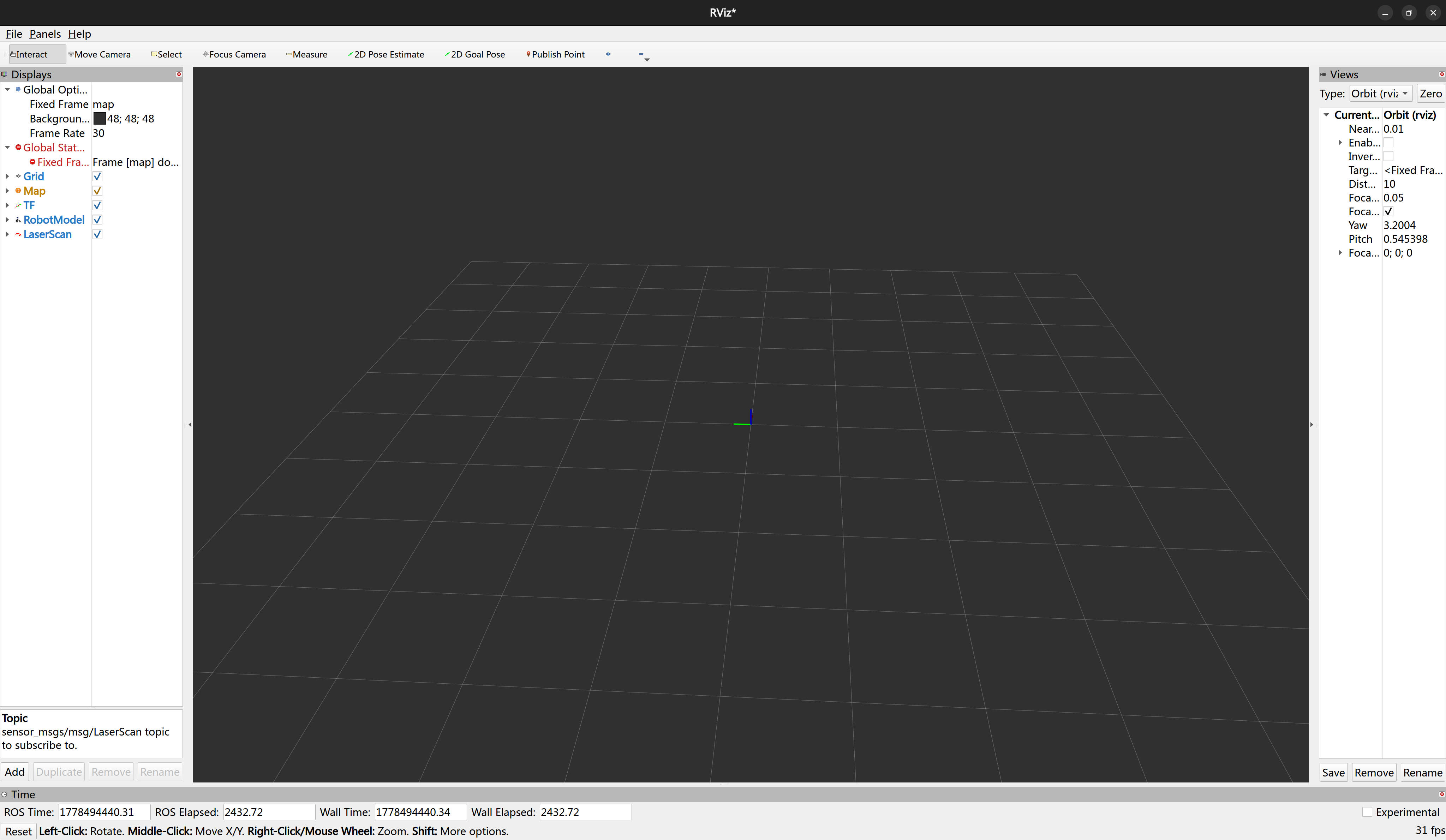
然后开始启动我们的仿真,看看效果:
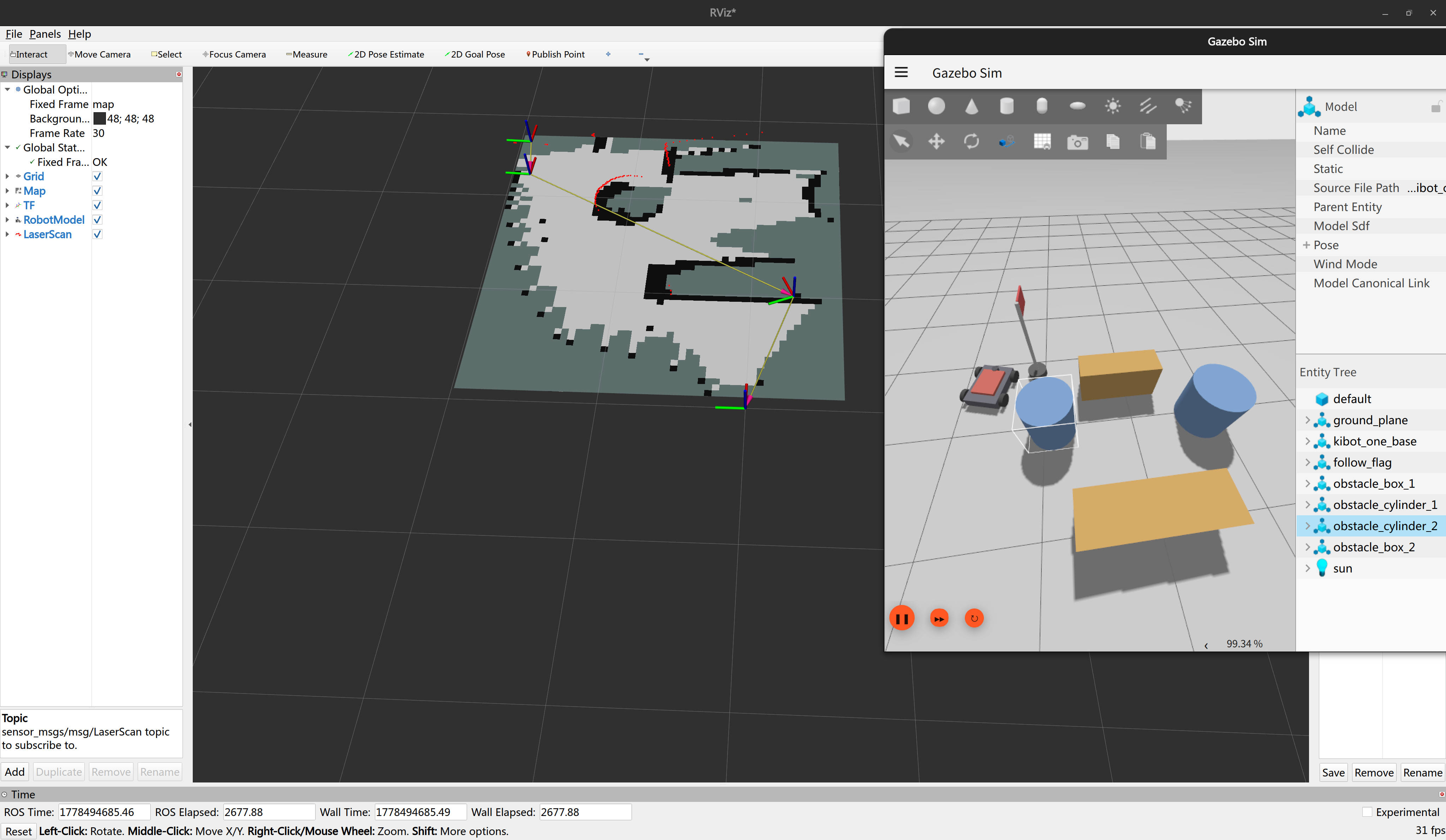
可以看到效果完美符合我们的预期!
包括我们手操也可以进行实时的 SLAM 建模:
就目前来说,我们已经完成了我们的 01 阶段——01-SLAM-建图与定位。