260523
继我们上次的进度继续。
我们上次已经给我们的 Nav2 的全局代价地图接入了滚动窗口。
上次我们少说了一个参数,track_unknown_space。
global_costmap:
  global_costmap:
    ros__parameters:
      global_frame: map
      robot_base_frame: base_link
      robot_radius: 0.34
      rolling_window: true
      width: 20
      height: 20
      track_unknown_space: false
这个参数是是否追踪未知区域的功能,如果设置为 false 的话,未知区域通常会被按照普通区域或可通行区域来进行处理;而如果设置为 true 的话,则未知区域通常会被按照 UNKNOWN 进行单独保留。
后续 planner 可以根据配置来决定是否穿行未知区域,来决定是否保守导航。
接下来我们给全局代价地图加入障碍层:
global_costmap:
  global_costmap:
    ros__parameters:
      global_frame: map
      robot_base_frame: base_link
      robot_radius: 0.34
      rolling_window: True
      width: 20
      height: 20
      track_unknown_space: false
      plugins: ["obstacle_layer", "inflation_layer"]
      obstacle_layer:
        plugin: "nav2_costmap_2d::ObstcaleLayer"
        observation_sources: scan
        scan:
          topic: /scan
          date_type: "LaserScan"
          clearing: True
          marking: True
      inflation_layer:
        plugin: "nav2_costmap_2d::InflationLayer"
        inflation_radius: 0.7
和我们局部代价地图的障碍层同理,这也是为了在全局进行 SLAM 建模而使用的参数。
然后就可以正式接入我们的 planner 了。
配置一下 planner server:
planner_server:
  ros__parameters:
    planner_plugins: ["GridBased"]
    GridBased:
      plugin: "nav2_navfn_planner::NavfnPlanner"
这里我们选择的 planner 实例名称为 GridBased,它使用了 NavfnPlanner 这个插件来作为实现。
至于为什么叫 GridBased...,因为 NavfnPlanner 是基于 costmap 网格来进行路径规划的经典全局规划器。它在二维栅格地图上探索路径,所以我们配置项也通常将这个 planner 实例命名为 GridBased。
再加入容差和 unknown 的策略:
planner_server:
  ros__parameters:
    planner_plugins: ["GridBased"]
    GridBased:
      plugin: "nav2_navfn_planner::NavfnPlanner"
      tolerance: 0.10
      use_astar: false
      allow_unknown: true
这里我们容差为 0.10,单位为米,即在目标不可达时,在周围 0.1 米范围内找一个可达的点来作为目标点来进行寻路过去。
然后是 use_astar,表示是否使用 A* 寻路算法, 我们设置为 false,表示使用基础的 Dijkstra 寻路算法。
最后的 allow_unknown 就是表示是否经过未知区域,相当于将未知区域当作普通的可通行区域来进行对待。
除此之外,我们还要接入 velocity smoother,来平滑我们的速度,让原始速度不是直接交给我们的 Gazebo,而是先交给 Smoother。
velocity_smoother:
  ros__parameters:
    smoothing_frequency: 20.0
    feedback: "OPEN_LOOP"
    max_velocity: [0.45, 0.0, 1.2]
    min_velocity: [-0.20, 0.0, -1.2]
    max_accel: [0.8, 0.0, 1.5]
    max_decel: [-0.8, 0.0, -1.5]
这里的 smoothing_frequency 表示每秒发布多少次平滑后的速度,我们这里设置为 20,即 20Hz。
然后是 feedback,这个参数在这里的作用是让平滑器根据什么反馈来估计当前速度,我们这里是让它根据上一次自己平滑后的速度输出来作为一个反馈,然后进行逼近 controller 所预期的速度。
下面的max/min_velocity 即表示最大的速度,这个数组从左到右分别代表 x, y 方向上的线速度和 z 轴上的角速度。
而 max_accel/decel则分别代表这几个方向上的最大加/减速度。
最后加入碰撞监控,用来在小车接近障碍物时限制运动:
collision_monitor:
  ros__parameters:
    base_frame_id: "base_link"
    odom_frame_id: "odom"
    cmd_vel_in_topic: "cmd_vel_smoothed"
    cmd_vel_out_topic: "cmd_vel"
这里表示它读取平滑速度,然后发布监控后的速度,但是当前由于我们的 Gazebo Bridge 是直接订阅的平滑速度,因此这里的 cmd_vel 更多的是作为一种观察是否接近碰撞的监控,而非速度的直接入口。
然后加入 footprint approach:
collision_monitor:
  ros__parameters:
    base_frame_id: "base_link"
    odom_frame_id: "odom"
    cmd_vel_in_topic: "cmd_vel_smoothed"
    cmd_vel_out_topic: "cmd_vel"
    polygons: ["FootprintApproach"]
    FootprintApproach:
      type: "polygon"
      action_type: "approach"
      footprint_topic: "/local_costmap/published_footprint"
      time_before_collision: 1.2
这里我们启用了一个碰撞检测区域,名字叫:FootprintApproach。
类型为polygon多边形,action_type 行动策略为 approach,表示根据当前速度预测机器人沿轨迹前进时,多久以后会撞上检测区域内的障碍物。如果碰撞时间太短,则就限制速度,让机器人不会在限制的时间内撞上去。
而这个多边形则从 footprint_topic 中的 /local_costmap/published_footprint 中进行获取,也就是用机器人自身的轮廓作为碰撞检查区域,而不是手写一个多边形。
最后的 time_before_collision 则就表示安全时间窗口,我们设置为了 1.2 秒。
总的来说就是:如果按照当前速度继续运动,预计 1.2 秒内会发生碰撞的话,则就触发 approach 的速度限制来进行保护。
然后我们编写一下启动文件 src/kibot_one_sim/launch/nav2.launch.py。
我们上次编写好了基本的骨架:
from launch import LaunchDescription

def generate_launch_description() -> LaunchDescription:
    return LaunchDescription([])
然后将我们需要复用的路径添加到里面:
from pathlib import Path

from ament_index_python.packages import get_package_share_directory
from launch import LaunchDescription

def generate_launch_description() -> LaunchDescription:
    sim_pkg_share = Path(get_package_share_directory(package_name="kibot_one_sim"))
    nav2_bringup_share = Path(get_package_share_directory(package_name="nav2_bringup"))

    return LaunchDescription(initial_entities=[])
然后引入我们需要的文件:
from pathlib import Path

from ament_index_python.packages import get_package_share_directory
from launch import LaunchDescription

def generate_launch_description() -> LaunchDescription:
    sim_pkg_share = Path(get_package_share_directory(package_name="kibot_one_sim"))
    nav2_bringup_share = Path(get_package_share_directory(package_name="nav2_bringup"))

    default_world = sim_pkg_share / "worlds" / "kibot_one_obstacles.worlds.sdf"
    sim_with_bridge_launch = sim_pkg_share / "launch" / "sim_with_bridge.launch.py"
    slam_launch = sim_pkg_share / "launch" / "slam.launch.py"
    nav2_navigation_launch = nav2_bringup_share / "launch" / "navigation_launch.py"
    nav2_rviz_config = nav2_bringup_share / "rviz" / "nav2_default_view.rviz"
    nav2_params = sim_pkg_share / "config" / "nav2_params.yaml"

    return LaunchDescription(initial_entities=[])
这些变量对应的文件还没有启动对应的东西,只是先引入进来。
然后声明我们所需的参数:
    world_arg = DeclareLaunchArgument(
        name="world",
        default_value=str(default_world),
        description="Gazebo 世界文件的绝对路径。",
    )
    params_file_arg = DeclareLaunchArgument(
        name="params_file",
        default_value=str(nav2_params),
        description="Nav2 参数文件路径。"
    )
这两个参数是核心参数,用于控制我们拉起 Nav2 的世界和 Nav2 参数文件的路径。
    use_sim_time_arg = DeclareLaunchArgument(
        name="use_sim_time",
        default_value="true",
        description="Nav2 是否使用仿真时间"
    )
    autostart_arg = DeclareLaunchArgument(
        name="autostart",
        default_value="true",
        description="是否自动激活 Nav2 lifecycle nodes。"
    )
这两个参数用于控制 Nav2 是否使用仿真时间,以及是否自动激活 Nav2 lifecycle nodes,如果不自动激活的话,可能会出现 Nav2 节点启动了但是进入不了激活状态的问题,/navigate_to_pose也不能正常执行目标。
    use_composition_arg = DeclareLaunchArgument(
        name="use_composition",
        default_value="false",
        description="是否使用 Nav2 组合节点容器。"
    )
    use_respawn_arg = DeclareLaunchArgument(
        name="use_respawn",
        default_value="false",
        description="Nav2 节点退出后是否自动重启。"
    )
我们当前节点默认不使用组合节点和自动重启,方便进行调试各个节点和日志。
然后接下来把 Gazebo 和 bridge 进行包起来。
    start_sim_arg = DeclareLaunchArgument(
        name="start_sim",
        default_value="true",
        description="是否同步启动 Gazebo 和 ros_gz_bridge。",
    )
    run_on_start_arg = DeclareLaunchArgument(
        name="run_on_start",
        default_value="true",
        description="是否使用 `-r` 参数让 Gazebo 启动后立刻运行仿真。"
    )
这里 run_on_start_arg 是一个很重要的参数,因为如果 Gazebo 在暂停状态的话, /odom 和 TF 不会稳定推送, Nav2 lifecycle 的激活会变得不可靠。
然后给他们包含进去:
    start_sim = IncludeLaunchDescription(
        launch_description_source=PythonLaunchDescriptionSource(launch_file_path=str(sim_with_bridge_launch)),
        launch_arguments={
            "world": LaunchConfiguration(variable_name="world"),
            "run_on_start": LaunchConfiguration(variable_name="run_on_start"),
        }.items(),
        condition=IfCondition(predicate_expression=LaunchConfiguration(variable_name="start_sim"))
    )
接下来把我们的 SLAM 也给包进去:
    start_slam_arg = DeclareLaunchArgument(
        name="start_slam",
        default_value="true",
        description="是否同时启动 slam_toolbox。"
    )
    use_lidar_static_tf_arg = DeclareLaunchArgument(
        name="use_lidar_static_tf",
        default_value="true",
        description="透传给 slam.launch.py,用于补齐 base_link -> lidar_link。"
    )
    start_slam = IncludeLaunchDescription(
        launch_description_source=PythonLaunchDescriptionSource(launch_file_path=str(slam_launch)),
        launch_arguments={
            "use_lidar_static_tf": LaunchConfiguration(variable_name="use_lidar_static_tf"),
        }.items(),
        condition=IfCondition(predicate_expression=LaunchConfiguration(variable_name="start_slam"))
    )
Nav2 和日志等级:
    start_nav2_arg = DeclareLaunchArgument(
        name="start_nav2",
        default_value="true",
        description="是否启动 Nav2 navigation stack。",
    )
    log_level_arg = DeclareLaunchArgument(
        name="log_level",
        default_value="info",
        description="Nav2 日志等级。",
    )
    start_nav2 = IncludeLaunchDescription(
        launch_description_source=PythonLaunchDescriptionSource(str(nav2_navigation_launch)),
        launch_arguments={
            "use_sim_time": LaunchConfiguration("use_sim_time"),
            "autostart": LaunchConfiguration("autostart"),
            "params_file": LaunchConfiguration("params_file"),
            "use_composition": LaunchConfiguration("use_composition"),
            "use_respawn": LaunchConfiguration("use_respawn"),
            "log_level": LaunchConfiguration("log_level"),
        }.items(),
        condition=IfCondition(LaunchConfiguration("start_nav2")),
    )
最后加入我们可选的 RViz:
use_rviz_arg = DeclareLaunchArgument(
    name="use_rviz",
    default_value="false",
    description="是否启动 RViz Nav2 默认视图。",
)
现在我们就可以把这些 actions 全部一股脑的塞到 LaunchDescription 中了:
    return LaunchDescription(initial_entities=[
        world_arg,
        params_file_arg,
        use_sim_time_arg,
        autostart_arg,
        use_composition_arg,
        use_respawn_arg,
        log_level_arg,
        start_sim_arg,
        run_on_start_arg,
        start_slam_arg,
        start_nav2_arg,
        use_lidar_static_tf_arg,
        use_rviz_arg,
        start_sim,
        start_slam,
        start_nav2,
        start_rviz,
    ])
最后构建,看看我们预期的参数:
(.venv) jese--ki@KiBall:~/Projects/dev/KiBots/KiBotTwo$ ros2 launch kibot_one_sim nav2.launch.py --show-args
Arguments (pass arguments as '<name>:=<value>'):

    'world':
        Gazebo 世界文件的绝对路径。
        (default: '/home/jese--ki/Projects/dev/KiBots/KiBotTwo/install/kibot_one_sim/share/kibot_one_sim/worlds/kibot_one_obstacles.worlds.sdf')

    'params_file':
        Nav2 参数文件路径。
        (default: '/home/jese--ki/Projects/dev/KiBots/KiBotTwo/install/kibot_one_sim/share/kibot_one_sim/config/nav2_params.yaml')

    'use_sim_time':
        Nav2 是否使用仿真时间
        (default: 'true')

    'autostart':
        是否自动激活 Nav2 lifecycle nodes。
        (default: 'true')

    'use_composition':
        是否使用 Nav2 组合节点容器。
        (default: 'false')

    'use_respawn':
        Nav2 节点退出后是否自动重启。
        (default: 'false')

    'log_level':
        Nav2 日志等级。
        (default: 'info')

    'start_sim':
        是否同步启动 Gazebo 和 ros_gz_bridge。
        (default: 'true')

    'run_on_start':
        是否使用 `-r` 参数让 Gazebo 启动后立刻运行仿真。
        (default: 'true')

    'start_slam':
        是否同时启动 slam_toolbox。
        (default: 'true')

    'start_nav2':
        是否启动 Nav2 navigation stack。
        (default: 'true')

    'use_lidar_static_tf':
        透传给 slam.launch.py,用于补齐 base_link -> lidar_link。
        (default: 'true')

    'use_rviz':
        是否启动 RViz Nav2 默认视图。
        (default: 'false')

    'use_lifecycle_manager':
        Enable bond connection during node activation
        (default: 'false')

    'slam_params_file':
        Full path to the ROS2 parameters file to use for the slam_toolbox node
        (default: '/opt/ros/jazzy/share/slam_toolbox/config/mapper_params_online_async.yaml')

    'namespace':
        Top-level namespace
        (default: '')

    'container_name':
        the name of conatiner that nodes will load in if use composition
        (default: 'nav2_container')
可以看到都符合我们的预期。
现在启动一下看看:
(.venv) jese--ki@KiBall:~/Projects/dev/KiBots/KiBotTwo$ ros2 launch kibot_one_sim nav2.launch.py use_rviz:=false
[INFO] [launch]: All log files can be found below /home/jese--ki/.ros/log/2026-05-23-13-54-01-379669-KiBall-45227
[INFO] [launch]: Default logging verbosity is set to INFO
[ERROR] [launch]: Caught exception in launch (see debug for traceback): name 'false' is not defined
[INFO] [gz-1]: process started with pid [45244]
[INFO] [bridge_node-2]: process started with pid [45245]
[INFO] [static_transform_publisher-3]: process started with pid [45246]
[INFO] [async_slam_toolbox_node-4]: process started with pid [45247]
[static_transform_publisher-3] [WARN] [1779515641.656860303] []: Old-style arguments are deprecated; see --help for new-style arguments
[static_transform_publisher-3] [INFO] [1779515641.702381386] [base_to_lidar_static_tf]: Spinning until stopped - publishing transform
[static_transform_publisher-3] translation: ('0.200000', '0.000000', '0.165000')
[static_transform_publisher-3] rotation: ('0.000000', '0.000000', '0.000000', '1.000000')
[static_transform_publisher-3] from 'base_link' to 'lidar_link'
[async_slam_toolbox_node-4] [INFO] [1779515641.841881314] [slam_toolbox]: Configuring
[INFO] [gz-1]: sending signal 'SIGINT' to process[gz-1]
[INFO] [bridge_node-2]: sending signal 'SIGINT' to process[bridge_node-2]
[INFO] [static_transform_publisher-3]: sending signal 'SIGINT' to process[static_transform_publisher-3]
[INFO] [async_slam_toolbox_node-4]: sending signal 'SIGINT' to process[async_slam_toolbox_node-4]
[bridge_node-2] [INFO] [1779515641.846686591] [rclcpp]: signal_handler(SIGINT/SIGTERM)
[static_transform_publisher-3] [INFO] [1779515641.846815963] [rclcpp]: signal_handler(SIGINT/SIGTERM)
[async_slam_toolbox_node-4] [INFO] [1779515641.847124222] [rclcpp]: signal_handler(SIGINT/SIGTERM)
[async_slam_toolbox_node-4] [INFO] [1779515641.925462560] [slam_toolbox]: Using solver plugin solver_plugins::CeresSolver
[async_slam_toolbox_node-4] [ERROR] [1779515641.925670731] [slam_toolbox]: Caught exception in callback for transition 10
[async_slam_toolbox_node-4] [ERROR] [1779515641.925673286] [slam_toolbox]: Original error: failed to create guard condition: the given context is not valid, either rcl_init() was not called or rcl_shutdown() was called., at ./src/rcl/guard_condition.c:67
[async_slam_toolbox_node-4] [ERROR] [1779515641.925685579] [slam_toolbox]: Failed to finish transition 1. Current state is now: errorprocessing (Could not publish transition: publisher's context is invalid, at ./src/rcl/publisher.c:423, at ./src/rcl_lifecycle.c:368)
[INFO] [static_transform_publisher-3]: process has finished cleanly [pid 45246]
[gz-1] /usr/lib/ruby/3.2.0/fiddle.rb:62:in `initialize': Interrupt
[gz-1]  from /usr/lib/ruby/3.2.0/fiddle.rb:62:in `new'
[gz-1]  from /usr/lib/ruby/3.2.0/fiddle.rb:62:in `dlopen'
[gz-1]  from /usr/lib/ruby/3.2.0/fiddle/import.rb:86:in `block in dlload'
[gz-1]  from /usr/lib/ruby/3.2.0/fiddle/import.rb:77:in `collect'
[gz-1]  from /usr/lib/ruby/3.2.0/fiddle/import.rb:77:in `dlload'
[gz-1]  from /opt/ros/jazzy/opt/gz_sim_vendor/lib/ruby/gz/cmdsim8.rb:398:in `execute'
[gz-1]  from /opt/ros/jazzy/opt/gz_tools_vendor/bin/gz:316:in `<main>'
[ERROR] [gz-1]: process has died [pid 45244, exit code -2, cmd 'gz sim -v 4 /home/jese--ki/Projects/dev/KiBots/KiBotTwo/install/kibot_one_sim/share/kibot_one_sim/worlds/kibot_one_obstacles.worlds.sdf'].
[INFO] [async_slam_toolbox_node-4]: process has finished cleanly [pid 45247]
[WARNING] [launch_ros.utilities.lifecycle_event_manager]: Abandoning wait for the '/slam_toolbox/change_state' service response, due to shutdown.
[ERROR] [bridge_node-2]: process has died [pid 45245, exit code -11, cmd '/opt/ros/jazzy/lib/ros_gz_bridge/bridge_node --ros-args --log-level info --ros-args -r __node:=kibot_one_bridge -r __ns:=/ --params-file /tmp/launch_params_i90tgh2y'].
嗯,貌似出现了报错,目前来看有下面的问题:
- use_composition_arg的default_value我们设置为的 false,但是这在 Python 中并不被识别,因此我们需要改回到 False。
- 我们的地图路径写的有问题,应该是 kibot_one_obstacles.world.sdf,我们写的是kibot_one_obstacles.worlds.sdf,world 后面多了个 s。
以及好几处单词拼写的问题,然后给我们的 collision_monitor 添加上 observation_sources:
collision_monitor:
  ros__parameters:
    base_frame_id: "base_link"
    odom_frame_id: "odom"
    cmd_vel_in_topic: "cmd_vel_smoothed"
    cmd_vel_out_topic: "cmd_vel"
    polygons: ["FootprintApproach"]
    FootprintApproach:
      type: "polygon"
      action_type: "approach"
      footprint_topic: "/local_costmap/published_footprint"
      time_before_collision: 1.2
    observation_sources: ["scan"]
    scan:
      type: "scan"
      topic: "scan"
      min_height: 0.15
      max_height: 2.0
      enabled: true
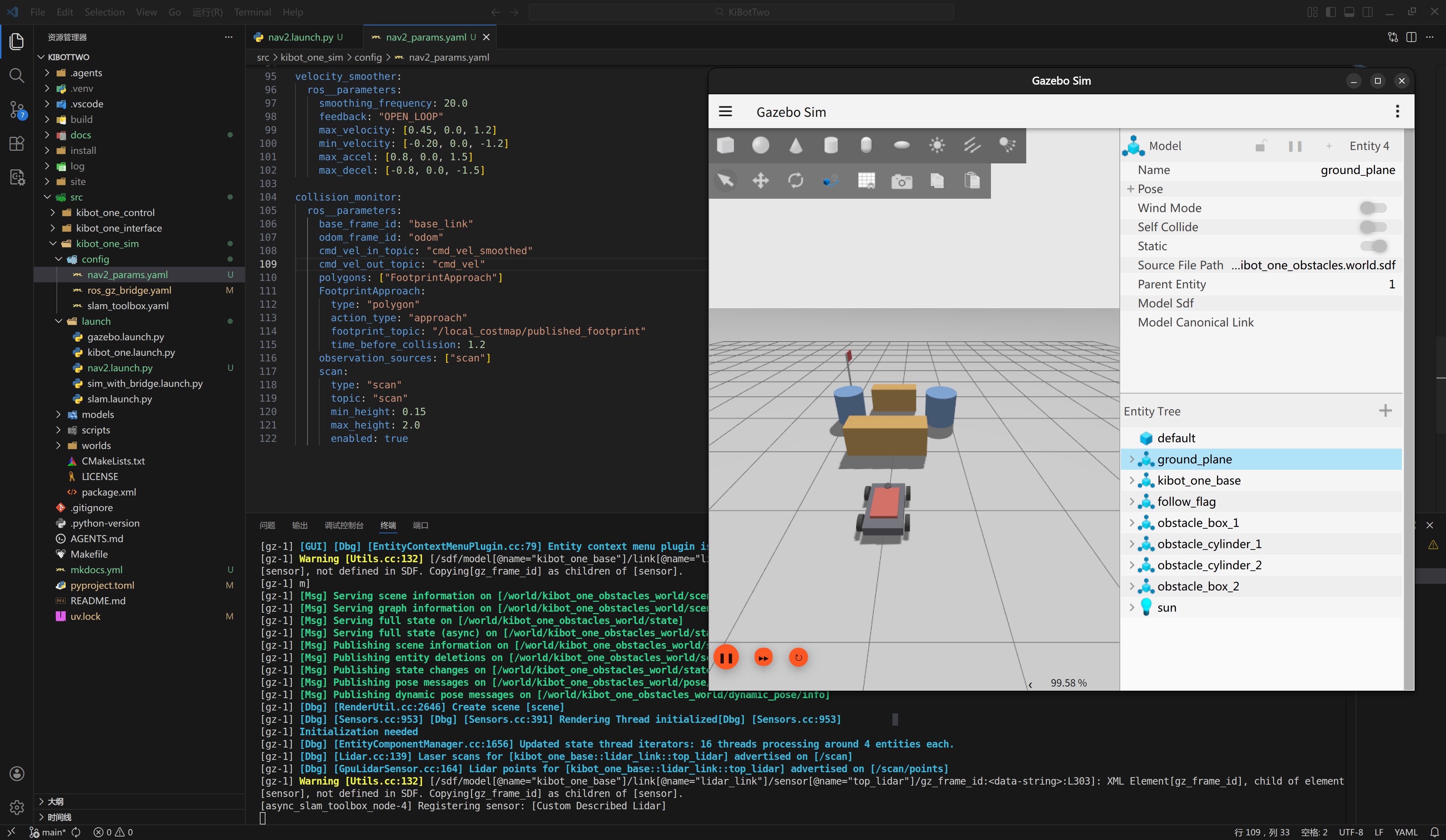
现在及已经成功拉起了: